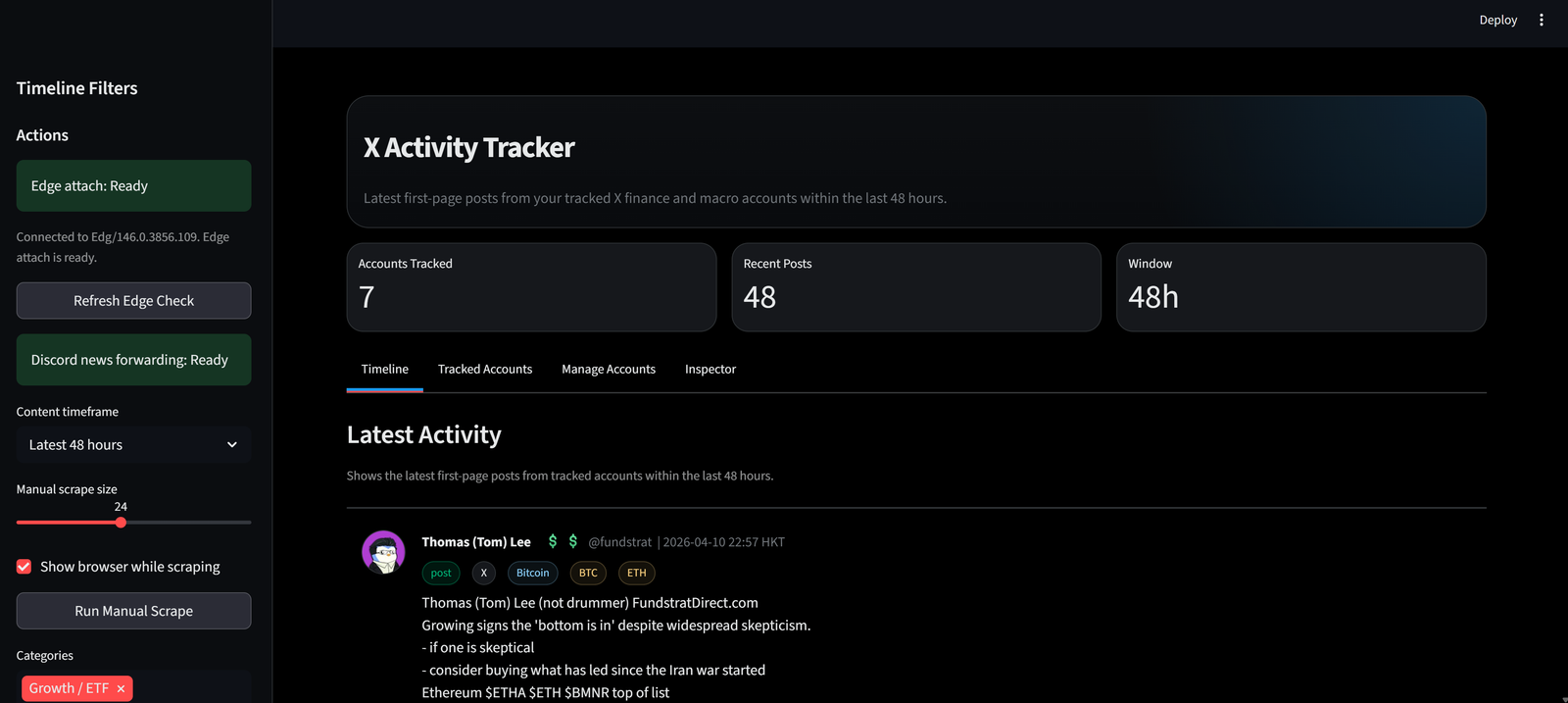
There is a lot of signal on X, but there is even more noise. If you follow people like Elon Musk, Michael Burry, Bill Ackman, Ray Dalio, Tom Lee, or crypto-focused accounts, you already know the problem: important posts move fast, but the feed is messy.
That was the reason I started building my own X tracker.
I wanted a simple system that could watch a selected group of finance and macro accounts, pull their latest activity, surface market-related posts first, and make the information easier to read than the native social feed.
This article is about what I built, how I built it, and why I think this kind of tracker is useful.
What is the X Tracker I am Trying to Build?
The goal of the tracker is simple:
Track a curated list of important X accounts, scrape their latest posts, organize the content into a clean dashboard, and highlight the posts that matter most for markets.
More specifically, I wanted the tracker to do a few things well:
- Follow selected X accounts in finance, macro, politics, and crypto
- Show only recent content, such as the latest 4, 12, or 48 hours
- Separate original posts from reposts and quoted posts, so authorship is clear
- Surface market-related posts more aggressively
- Mark "hot" posts based on engagement
- Forward priority posts to Discord
- Give me a clean interface that is easier to scan than X itself
In other words, I was not trying to build another social app. I was trying to build a market-monitoring tool.
Why Not Just Use X Directly?
Because X is great for discovery, but not great for structured monitoring.
When I am tracking finance or macro accounts, I care about a few specific questions:
- Did this person post anything in the last few hours?
- Was it an original comment, a repost, or a quoted post?
- Was it related to stocks, crypto, or macro?
- Is it getting unusual engagement?
- Should I send it to Discord immediately?
That is very different from casual social browsing. The native X experience is optimized for engagement. My tracker is optimized for signal extraction.
How I Built the Tracker
I kept the stack practical and lightweight.
Core Stack
I used:
- Python for scraping and orchestration
- Playwright for browser automation
- SQLite for local storage
- Streamlit for the dashboard UI
- PowerShell and Windows Task Scheduler for local automation
- Discord webhook integration for forwarding important posts
This was a good fit because I wanted something I could build and run locally without needing a heavy backend.
Step 1: Start with Scraping
The first version was simple: scrape a few tracked X accounts and store the posts in SQLite.
At the beginning, the hardest part was not storage or UI. It was getting the content reliably.
X scraping is tricky because:
- Feed order is not always chronological
- Reposts and quotes can be confusing to parse
- Some pages render differently depending on login state
- Background/browser automation on Windows can get blocked
So the scraping layer had to evolve a lot.
Step 2: Reuse My Logged-In Edge Session
One important improvement was using my existing logged-in Edge browser session.
Instead of scraping anonymously, the tracker can attach to a live Edge session with X already logged in. That gave me a much better chance of seeing the same content I saw manually in the browser.
That mattered a lot for accounts where anonymous scraping was incomplete or inconsistent.
Step 3: Clean the Post Structure
Once the scraper could capture more content, the next challenge was clarity.
For example, if Elon reposts someone else's post, I do not want the tracker to make it look like Elon wrote that original text.
So I added logic to split content into:
- Original post text
- Repost note
- Quoted author
- Quoted content
- Media
- Engagement stats
That made the feed much easier to trust.
Step 4: Add Prioritization
After basic scraping worked, I added logic to rank the feed.
Two markers became especially useful:
- $$ for market-priority posts
- 🔥 for hot posts
A post gets $$ if it looks related to stocks or crypto, for example:
- It contains a cashtag like $TSLA
- It references known tickers
- It mentions common crypto assets like BTC or ETH
Those posts get pinned higher in the feed.
A post gets 🔥 if its engagement is unusually strong relative to that account's normal baseline.
That way, I am not just tracking what was posted. I am tracking what might actually matter.
Step 5: Build the Dashboard
I used Streamlit because it is fast to iterate.
The dashboard now includes:
- Latest activity feed
- Account filters
- Timeframe filters
- Market-priority pinning
- Hot-post markers
- Repost/quote separation
- Engagement display
- Schedule status
- Manual scraping controls
The goal was not fancy design. The goal was speed and readability.
Step 6: Add Discord Forwarding
After the feed became usable, I added a second workflow:
If a post is marked as market-priority ($$), forward it to a Discord #news channel.
That turns the tracker from a passive dashboard into an alerting system.
I also added deduplication logic so the same article or post does not get forwarded repeatedly.
Step 7: Solve the Scheduling Problem
This part was more annoying than expected.
Background Playwright scraping on Windows kept failing with permission and process-launch issues. After a lot of debugging, I ended up switching to a more stable approach:
Use Windows Task Scheduler instead of relying on an internal background daemon.
That turned out to be the better solution for this machine and made scheduled scraping much more reliable.
Demo Video
What Can I Do with This X Tracker?
This is where the tool becomes useful.
1. Track Market-Moving Commentary Faster
If a tracked account posts about Tesla, Bitcoin, tariffs, inflation, rates, AI, a specific company, or a major macro theme, I can see it quickly without scrolling through an entire social feed.
2. Separate Signal from Noise
Not every post matters. The tracker helps me focus on:
- Recent posts
- Market-related posts
- High-engagement posts
- Selected accounts only
That reduces noise dramatically.
3. Catch High-Priority Content Earlier
The $$ priority logic is simple, but powerful.
Instead of treating all posts equally, the tracker gives extra attention to posts that are more likely to matter for stocks or crypto.
That makes the dashboard more actionable.
4. Use Discord as a Lightweight Alert System
The Discord integration means I do not always have to sit in front of the tracker.
If something important appears, it can be pushed to a news channel automatically.
That is useful if I want the tracker to become part of a larger workflow.
5. Build a Research Archive Over Time
Because the posts are stored locally, this can also become a research tool.
Over time, I can compare:
- Who posts the most
- Who posts the most market-related content
- What topics appear most often
- Which posts get unusual engagement
- How often important accounts repost versus write original commentary
That opens the door to much deeper analysis later.
What I Learned from Building It
A few things stood out.
First, scraping social platforms is always more fragile than it looks. The hard part is not writing the scraper. The hard part is getting consistent, trustworthy results.
Second, clean presentation matters a lot. Even when the data is technically correct, a confusing UI can make the tool much less useful.
Third, a "small" tracker quickly becomes a systems project. Once you add scraping, cleaning, scheduling, notifications, prioritization, and UI, you are no longer building a script. You are building a workflow.
Where This Can Go Next
This tracker already does a lot, but there are obvious next steps:
- Improve scrape completeness for difficult accounts
- Add stronger stock and crypto entity recognition
- Measure account-specific influence over time
- Build better sentiment and topic tagging
- Compare post timing with price movement
- Extend it into a real event-monitoring platform
The current version is already useful, but it also feels like a strong foundation for something bigger.
Final Thoughts
I built this X tracker because I wanted a better way to monitor a small group of important accounts without getting lost in the noise of a social feed.
What started as a scraping experiment turned into a practical market-monitoring tool: one that helps me see recent posts more clearly, prioritize market-related content, and forward important items into a workflow I actually use.
For me, that is the biggest value of building tools like this. Not just collecting data, but turning messy information into something readable, trackable, and useful.
Back to Blog